Protect Your Privacy. Secure Your Finances. Explore the Future of Cybersecurity.

Authy vs Google Authenticator: Which 2FA App Reigns Supreme in 2025?
Marty Olo
11/24/2025

Two-factor authentication is no longer optional in 2025. With phishing and credential-stealing malware hitting record highs, using a strong 2FA app is the simplest way to protect your accounts.
Two major players dominate the space: Authy and Google Authenticator.
Both generate time-based one-time passwords (TOTP), but they differ in backup capabilities, ease of recovery, and multi-device support.
This 2025 comparison breaks down everything you need to know so you can pick the right authenticator for your workflow, security preference, and devices.
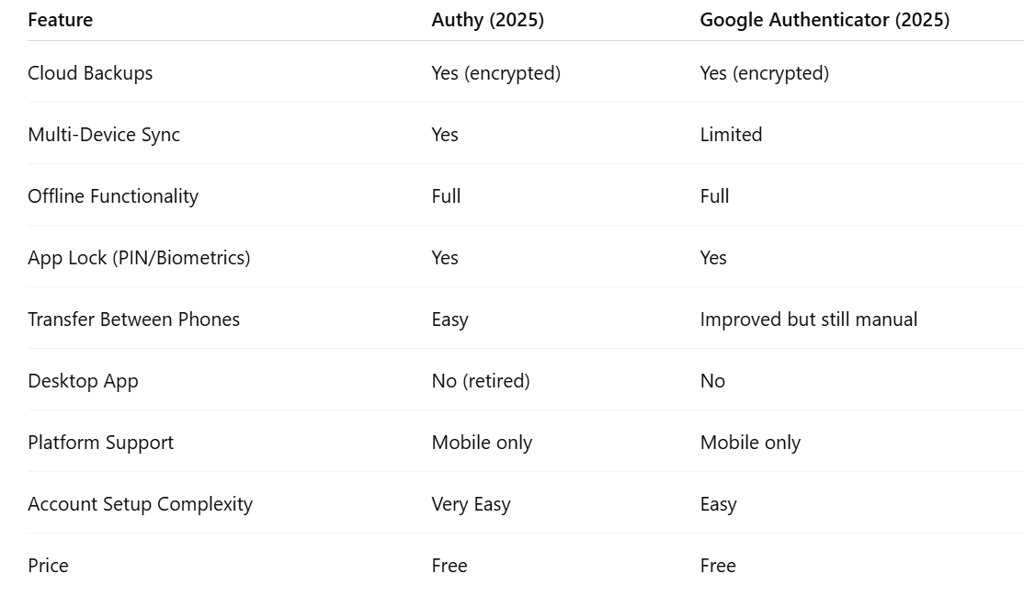
1. Authy vs Google Authenticator: Quick Comparison Table
Both apps have evolved significantly, but they still take different approaches to convenience and security.
2. Security Features: How Safe Are They in 2025?
Authy Security
Authy uses:
Encrypted cloud backups
Multi-device authorization
Biometric app lock
Phone number verification
Zero-knowledge encryption for backup passwords
While cloud backups make life easier, some users prefer keeping secrets local only. Authy gives you both choices.
Google Authenticator Security
Google upgraded in 2023 by adding:
Encrypted cloud syncing
Encrypted backups tied to your Google Account
Cross-device code availability (limited)
App lock support
Google's local-only approach is still supported, but its sync implementation is more restrictive and less flexible than Authy.
Winner: Tie
Authy wins on flexibility. Google wins on tighter Google Account ecosystem integration.
3. Backup & Recovery Options
This section is where the two apps truly separate.
Authy Backup Process
Authy is famous for having the best recovery system in the industry:
Encrypted cloud backups
Backup password for end-to-end encryption
Fast restore on any authorized device
Multi-device support for redundancy
Lose your phone? No big deal. Login, restore, done.
Google Authenticator Backup Process
Until recently, Google Authenticator forced you to manually export/import codes. In 2025, the experience is better:
Cloud sync via Google Account
Automatic recovery when signing into a new device
Still no multi-device control panel
Still no granular backup management
Export feature remains one-device-at-a-time
You get convenience, but not the same level of control Authy provides.
Winner: Authy
Authy simplifies recovery and prevents lockouts far better than Google Authenticator.
4. Multi-Device Support
Authy Multi-Device
Authy lets you:
Install the app on multiple devices
Sync codes between them
Enable or disable device syncing anytime
Authorize each new device for security
This is ideal for users who want a phone + tablet setup or keep a backup device at home.
Google Authenticator Multi-Device
Google added limited multi-device syncing through your Google Account.
The limitations:
No device management page
No way to revoke a single device
Sync works only when logged into the same Google account
No control for blocking unauthorized devices
Winner: Authy
Authy’s multi-device system is more transparent, secure, and flexible.
5. Ease of Use & Interface
Authy UI
Modern design
Quick search feature
Codes grouped by account icons
Smooth onboarding process
Google Authenticator UI
Clean and minimal
No search bar
Codes can stack up if you have many accounts
Recent updates improved code labeling and color indicators
Winner: Authy
Both are easy, but Authy handles large numbers of codes better.
6. Platform Availability (2025 Update)
Authy
Previously had Windows and macOS apps, but they were retired in 2024 due to security modernization.
Now available only on:
iOS
Android
Google Authenticator
Available on:
iOS
Android
No desktop app for either.
Winner: Tie
7. Which 2FA App Should YOU Choose in 2025?
Here’s the bottom-line advice.
Choose Authy if you…
Want the easiest recovery experience
Use more than one device
Want encrypted cloud backups
Like controlled device authorization
Prefer a more intuitive UI
Choose Google Authenticator if you…
Already live heavily in the Google ecosystem
Prefer simplicity without extra account setup
Want encrypted backups tied to your Google account
Only use 2FA on a single phone
8. Final Verdict: Authy vs Google Authenticator (2025 Winner)
Both apps are secure, modern, and trusted by millions.
But for most users, Authy is still the better 2FA app in 2025.
Why Authy Wins:
Best backup system
True multi-device support
Easier recovery after phone loss
Better handling of multiple accounts
Google Authenticator is still great for minimalists and people deep in the Google ecosystem, but it trails Authy in flexibility and recovery.
Stay Secure, Stay Informed
Your source for online privacy and protection.
Copyright © 2026. - PrivyShield - All rights reserved.