Protect Your Privacy. Secure Your Finances. Explore the Future of Cybersecurity.

Google Titan Security Key Review (2025): Still Worth It?
Marty Olo
11/25/2025
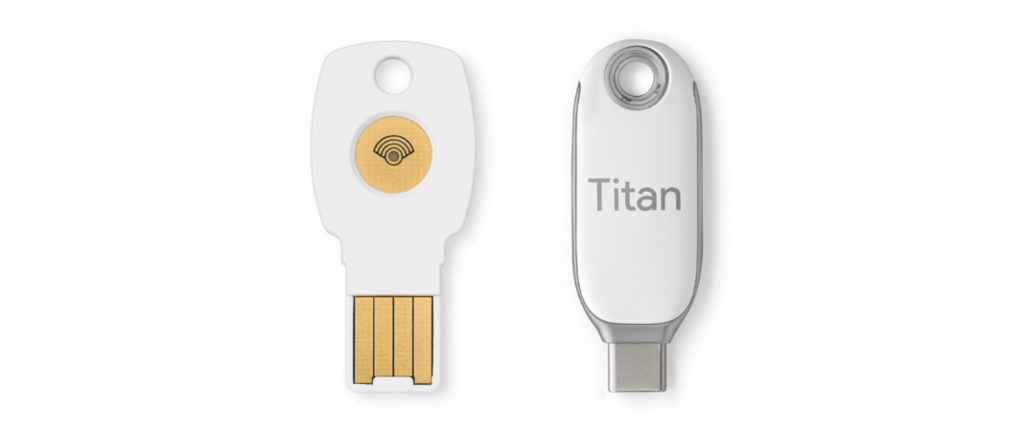
Credit: Google
In an era where cyberattacks are growing more sophisticated, hardware security keys have become a gold standard for online protection. Google’s Titan Security Key has been on the market for several years, promising phishing-resistant, strong two-factor authentication (2FA). But in 2025, with so many options available, is it still worth investing in a Titan key?
In this review, we’ll cover its features, pros and cons, setup guide, and who should consider using it.
What is the Google Titan Security Key?
The Google Titan Security Key is a physical hardware device that adds an extra layer of security to your online accounts. Unlike app-based 2FA methods, the Titan key relies on cryptographic authentication, making it extremely resistant to phishing attacks.
Key Features:
Works with FIDO2 and U2F standards
Available in USB-A, USB-C, and Bluetooth/NFC models
Compatible with Google accounts, password managers, and major platforms
Designed for individuals and enterprise security
Pros of the Google Titan Security Key
Phishing-Resistant Security: Hardware keys verify logins directly, making phishing nearly impossible.
Cross-Platform Compatibility: Works with Windows, macOS, Android, and iOS.
Durable and Portable: Small, lightweight, and easy to carry on a keychain.
Works Offline: No need for internet or mobile apps to generate codes.
Enterprise-Friendly: Ideal for organizations that require strict security policies.
Cons of the Google Titan Security Key
Cost: Prices start around $50, which may be steep for casual users.
Limited Recovery Options: Losing your key without a backup can lock you out of accounts.
Setup Learning Curve: Slightly more technical than app-based 2FA methods.
Bluetooth Model Battery Dependency: The wireless key requires battery power, which eventually runs out.
How to Set Up Your Google Titan Security Key
Setting up your Titan Security Key is straightforward. Here’s a step-by-step guide:
Step 1: Prepare Your Account
Log in to your Google account or any service that supports hardware keys.
Navigate to Security → 2-Step Verification → Add Security Key.
Step 2: Register the Key
Insert the Titan key into your computer’s USB port (or connect via Bluetooth/NFC).
Follow the on-screen instructions to tap or press the key.
Step 3: Confirm Setup
Test your key by signing out and signing back in.
Use it alongside your password for the added layer of security.
Step 4: Backup Options
Consider purchasing a second key as a backup in case the first one is lost.
Store backup keys securely in a safe location.
Who Should Consider Using the Google Titan Security Key?
Individuals with high-value accounts: Email, banking, crypto wallets, and social media accounts.
Businesses and IT admins: To secure employee logins and protect sensitive company data.
Privacy-focused users: Those who want strong, phishing-resistant security beyond passwords and 2FA apps.
Frequent travelers: Bluetooth/NFC options make mobile logins convenient without internet dependency.
Final Verdict: Is It Still Worth It in 2025?
The Google Titan Security Key remains a solid choice for anyone serious about cybersecurity. Its phishing-resistant features, multi-platform support, and enterprise readiness make it a worthy investment for both individuals and organizations.
However, casual users who manage only a few accounts might find app-based 2FA methods like Authy or Google Authenticator sufficient and more convenient.
Bottom line: If your priority is maximum account security and you’re willing to invest in a physical device, the Titan Security Key is still a top contender in 2025.
Stay Secure, Stay Informed
Your source for online privacy and protection.
Copyright © 2026. - PrivyShield - All rights reserved.