Protect Your Privacy. Secure Your Finances. Explore the Future of Cybersecurity.

The 10 Best Two-Factor Authentication Apps of 2025: Which One Keeps You Safest?
Marty Olo
10/23/2025
Why Two-Factor Authentication Matters More Than Ever
In 2025, online security is no longer optional — it’s essential. With cyberattacks, phishing schemes, and credential leaks rising every year, a simple username and password just don’t cut it anymore. That’s where Two-Factor Authentication (2FA) comes in.
2FA adds an extra layer of protection by requiring a second verification step — typically a time-based code, push notification, or hardware token. Even if hackers steal your password, they still can’t get in without that second factor.
But with so many 2FA apps available today, which one truly keeps your data safe? Below, we’ve rounded up the 10 best two-factor authentication apps of 2025 — tested, compared, and ranked for security, usability, backup features, and cross-platform support.
1. Authy by Twilio – Best Overall 2FA App
Why it stands out:
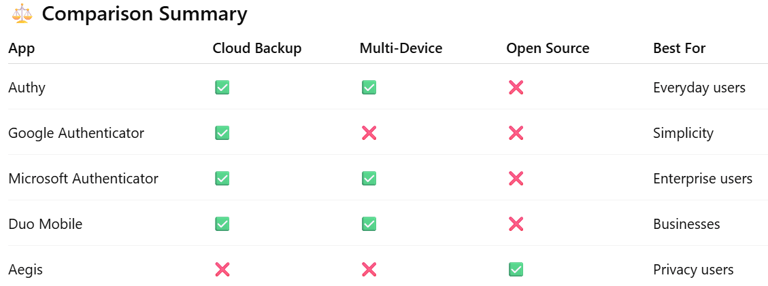
Authy remains a fan favorite for its cloud backups, multi-device sync, and strong encryption. It’s perfect for users who switch phones frequently or manage multiple accounts.
Key Features:
Secure encrypted backups (protected by a password)
Multi-device support (sync across phone, tablet, and desktop)
Works offline
PIN and biometric app lock
Best For: Everyday users who value simplicity and reliability.
Platforms: Android, iOS, Windows, macOS
Pro Tip: Authy encrypts your 2FA tokens before storing them in the cloud — meaning even Twilio can’t read them.
2. Google Authenticator – The Classic Choice
Why it stands out:
Google Authenticator got a major 2025 refresh, finally introducing cloud backup and code transfer via QR export — features long requested by users.
Key Features:
Easy setup with QR codes
Works offline
Cloud backup with Google account
Clean, ad-free interface
Best For: Google ecosystem users and those who prefer simplicity.
Platforms: Android, iOS
3. Microsoft Authenticator – Best for Microsoft 365 Users
Why it stands out:
Microsoft Authenticator integrates tightly with Windows, Azure, and Microsoft 365, enabling passwordless logins and push-based verification.
Key Features:
Passwordless login support
Multi-account management (Microsoft + non-Microsoft)
Backup and restore through cloud sync
Biometric and PIN lock
Best For: Professionals and enterprises using Microsoft services.
Platforms: Android, iOS
4. Duo Mobile – Best for Businesses and Teams
Why it stands out:
Owned by Cisco, Duo Mobile is a trusted enterprise-grade solution. It offers multi-user management, risk-based authentication, and policy control for IT admins.
Key Features:
Push notifications for fast login
Device health checks
Integration with SSO and VPN platforms
Great for teams and businesses
Best For: Companies implementing zero-trust frameworks.
Platforms: Android, iOS
5. Aegis Authenticator – Best Open-Source Option
Why it stands out:
For privacy-focused users, Aegis Authenticator delivers full offline functionality and strong encryption — without requiring a cloud account.
Key Features:
100% offline
Encrypted local vault
Export and import flexibility
Open-source transparency
Best For: Privacy advocates and advanced users.
Platforms: Android
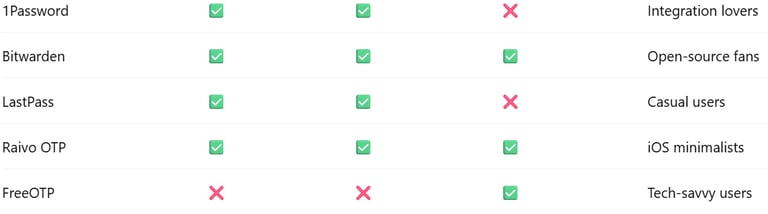
6. 1Password with Built-In 2FA – Best for Integration Lovers
Why it stands out:
1Password’s built-in TOTP generator lets users store logins and 2FA codes together. It’s perfect for those who want one dashboard for everything.
Key Features:
Integrates 2FA with password management
Secure cross-device sync
Autofill support
Family and team sharing options
Best For: Users who already rely on password managers.
Platforms: Android, iOS, Windows, macOS
7. Bitwarden Authenticator – Best for Open-Source Password Managers
Why it stands out:
Bitwarden’s TOTP generator combines open-source transparency with excellent encryption and cloud sync.
Key Features:
Built into Bitwarden vault
Open-source security
Cloud sync for all devices
Supports passwordless login
Best For: Security enthusiasts who love open-source tools.
Platforms: Android, iOS, Browser extensions
8. LastPass Authenticator – Best for Simple, Push-Based Logins
Why it stands out:
LastPass Authenticator focuses on push notifications and one-tap verification, minimizing manual code entry.
Key Features:
One-tap login approvals
Cloud backup with LastPass account
Works with most online services
Optional PIN protection
Best For: Users seeking convenience and automation.
Platforms: Android, iOS
9. Raivo OTP – Best Lightweight iOS Option
Why it stands out:
Raivo is a sleek, open-source 2FA app for iPhone users who want simplicity without ads or tracking.
Key Features:
Encrypted keychain storage
Apple iCloud sync
Open-source and ad-free
Elegant, minimal interface
Best For: iOS users who value privacy and design.
Platforms: iOS
10. FreeOTP – Best Lightweight Android App
Why it stands out:
Developed by Red Hat, FreeOTP is a minimal, no-frills app that just works — great for users who want complete local control.
Key Features:
100% offline
No permissions or tracking
Simple QR setup
Open-source
Best For: Security professionals and open-source fans.
Platforms: Android, iOS
Final Verdict: Which 2FA App Is Right for You?
Choosing the right 2FA app depends on your lifestyle and privacy priorities:
Best Overall: Authy
Best for Businesses: Duo Mobile
Best for Privacy: Aegis or Raivo OTP
Best for Microsoft Ecosystem: Microsoft Authenticator
Best Integrated Password Manager: 1Password or Bitwarden
The key takeaway? Any 2FA app is better than none. But if you want convenience and maximum protection, Authy or Microsoft Authenticator are hard to beat in 2025.
Pro Security Tip
Enable 2FA on every major account — email, banking, cloud storage, and social media. For maximum safety, combine app-based 2FA with a hardware key like YubiKey for phishing-proof authentication.
Sources
Twilio Authy – Product Overview
Google Authenticator Update 2025 – Official Blog
Microsoft Authenticator Documentation
Help Net Security – Top Authentication Tools of 2025
Cisco Duo – Product Features
Stay Secure, Stay Informed
Your source for online privacy and protection.
Copyright © 2026. - PrivyShield - All rights reserved.