Protect Your Privacy. Secure Your Finances. Explore the Future of Cybersecurity.

The Best Budget Hardware Security Keys Under $50
Marty Olo
12/1/2025

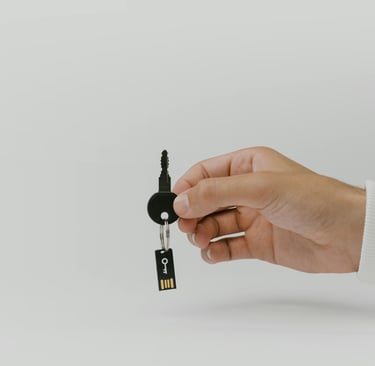
As online threats continue to grow, more people are recognizing that passwords alone are not enough to protect their digital lives. Phishing attacks, credential stuffing, and account takeovers happen every day—even to cautious users. That’s where hardware security keys come in.
A hardware security key provides strong, phishing-resistant authentication, making it nearly impossible for attackers to access your accounts—even if they manage to steal your password. And while top-tier keys like YubiKey Series 5 are highly praised, not everyone wants to pay $70–$90 for one.
The good news? You don’t have to.
In this guide, we break down The Best Budget Hardware Security Keys Under $50, focusing on alternatives that deliver reliable, real-world security without the premium price tag. Whether you're a student, freelancer, or privacy-conscious user on a budget, these hardware keys offer great protection at an affordable price.
Why Choose a Budget Hardware Security Key?
If you're considering hardware authentication but don’t want to overspend, budget-friendly security keys are a great starting point. Here’s why:
Affordable protection: Under $50, but still highly secure
Phishing-resistant authentication: Attackers cannot trick your device into giving them access
Easy setup: Works with Google, Microsoft, Facebook, GitHub, and more
Durability: Many are water-resistant and tamper-proof
No batteries, no apps needed
Budget keys may not include every advanced feature, but they still offer massive security improvements over passwords and SMS codes.
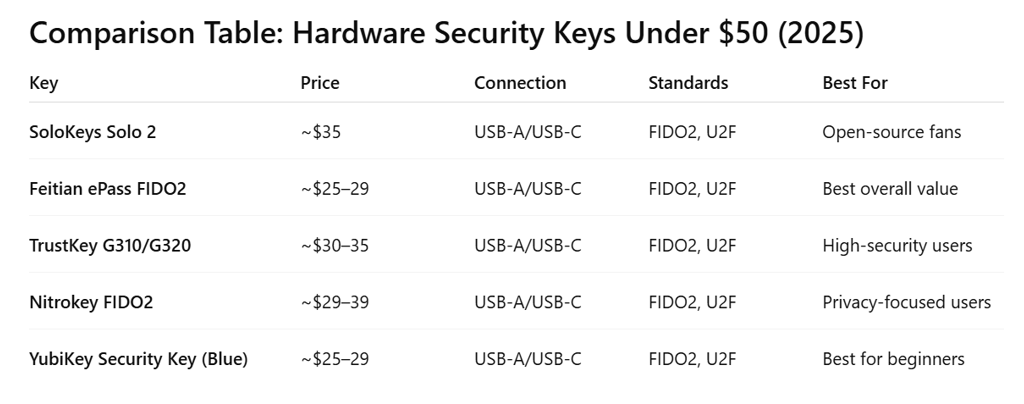
1. SoloKeys Solo 2 – The Best Open-Source Budget Security Key
Price: ~$35
Connection Options: USB-A, USB-C
Standards: FIDO2, U2F
Best For: Users who want an open-source hardware key under $50
The Solo 2 is one of the most popular budget-friendly hardware keys thanks to its open-source design and strong support for FIDO2.
Because the firmware and hardware are auditable, many privacy-focused users prefer SoloKeys to proprietary alternatives.
Key Features
Fully open-source hardware and firmware
FIDO2 + U2F support
Durable and compact design
USB-A or USB-C version available
Works with Windows, macOS, Linux, Android, and major platforms
Pros
Open-source transparency
Very affordable
Strong community support
Cons
No NFC on the budget model
Build quality is solid but not premium
2. Feitian ePass FIDO2 Security Key – Best Value Overall
Price: ~$25–$29
Connection Options: USB-A, USB-C
Standards: FIDO2, U2F
Best For: Everyday users who want the reliability of a well-known brand
Feitian is a major manufacturer behind the scenes (many branded enterprise keys are actually Feitian-built). The ePass FIDO2 series offers excellent security at a fraction of the cost of high-end keys.
Key Features
FIDO2 and U2F support
Plug-and-play compatibility
Durable metal keyring loop
No drivers required
Pros
Very affordable
Strong reputation and quality
Works across all major browsers
Cons
No NFC on the under-$30 model
Fewer advanced features than premium keys
3. TrustKey G310/G320 – Strong Security Without the High Price
Price: ~$30–$35
Connection Options: USB-A (G310), USB-C (G320)
Standards: FIDO2, U2F
Best For: Users who want military-grade authentication on a budget
TrustKey hardware keys are known for their biometric-free but high-assurance FIDO2 authentication. They’re sturdy, fast, and easy to set up.
Key Features
FIDO2 Level 2 certified
High-speed authentication
Rugged build quality
No additional apps required
Pros
Excellent security for the price
Good for enterprise or personal use
Works flawlessly on Windows Hello and Microsoft accounts
Cons
Bulkier than ultra-small keys
No NFC support
4. Nitrokey FIDO2 – A Transparent, Open-Source Favorite
Price: ~$29–$39
Connection Options: USB-A, USB-C
Standards: FIDO2, U2F
Best For: Privacy experts who love open-source hardware
Nitrokey is a respected name in open-source security products, and their FIDO2 key is a solid option under $50. It delivers trustworthy, verifiable security at a reasonable price.
Key Features
Open-source firmware
FIDO2 + U2F support
Side button for easy touch authentication
No proprietary tracking or telemetry
Why Users Love It
Nitrokey’s transparency and community involvement make their products popular among developers, sysadmins, and privacy purists.
Pros
Open-source
Trusted European manufacturer
Good security for cost
Cons
Slightly larger than average
No NFC support on budget models
5. YubiKey Security Key Series (Blue Edition) – The Best Under $50 From Yubico
Price: $25–$29
Connection Options: USB-A, USB-C
Standards: FIDO2, U2F
Best For: Users who want Yubico quality at an entry-level price
Yubico’s blue Security Key Series offers the reliability of the YubiKey brand without the high price tag of premium models.
While these budget-friendly keys lack NFC and multi-protocol support (like PIV or OpenPGP), they’re still one of the most widely supported keys in the world.
Key Features
FIDO2 and U2F supported
Extremely durable
Supported across almost all platforms
Works with Google, Microsoft, Facebook, Twitter, GitHub, and more
Pros
Industry-leading durability
Excellent ecosystem compatibility
Very affordable compared to the Series 5
Cons
No NFC
No advanced protocols (only FIDO2/U2F)
How to Choose the Best Budget Security Key
When selecting a hardware key under $50, consider:
1. Your Device and Port Type
USB-C laptops/phones → Solo 2 USB-C or Feitian USB-C
USB-A desktops → TrustKey G310 or YubiKey USB-A
2. Need for Open-Source
If transparency matters:
SoloKeys Solo 2
Nitrokey FIDO2
3. Compatibility with Your Accounts
If you mostly use:
Google → All listed options
Microsoft → TrustKey or Yubico
Linux dev environment → Solo or Nitrokey
4. Durability
For travel or daily use on a keychain:
Yubico Blue Series
TrustKey G320
Why Budget Security Keys Are Worth It in 2025
As cyberattacks rise, hardware-based authentication is becoming the gold standard—used by enterprises, governments, developers, and now everyday users.
Even at under $50, these keys offer:
Phishing-resistant login protection
Offline, tamper-proof security
No potential data harvesting
Long-term reliability
They’re one of the best security investments a user can make in 2025—far outperforming SMS codes, email verification, or app-based 2FA alone.
Final Thoughts
You don’t need to spend $70+ to protect your accounts with strong, hardware-based security. Whether you value open-source transparency, top-tier durability, or simple plug-and-play functionality, these budget-friendly keys deliver powerful authentication without the high price tag.
For everyday users, students, freelancers, and small business owners, these under-$50 hardware security keys offer real, meaningful protection at a wallet-friendly cost.
Stay Secure, Stay Informed
Your source for online privacy and protection.
Copyright © 2026. - PrivyShield - All rights reserved.